

Introduction
You spend hours scrolling through LinkedIn jobs, tweaking your profile, and sending out applications. But the responses barely trickle in. Sound familiar?

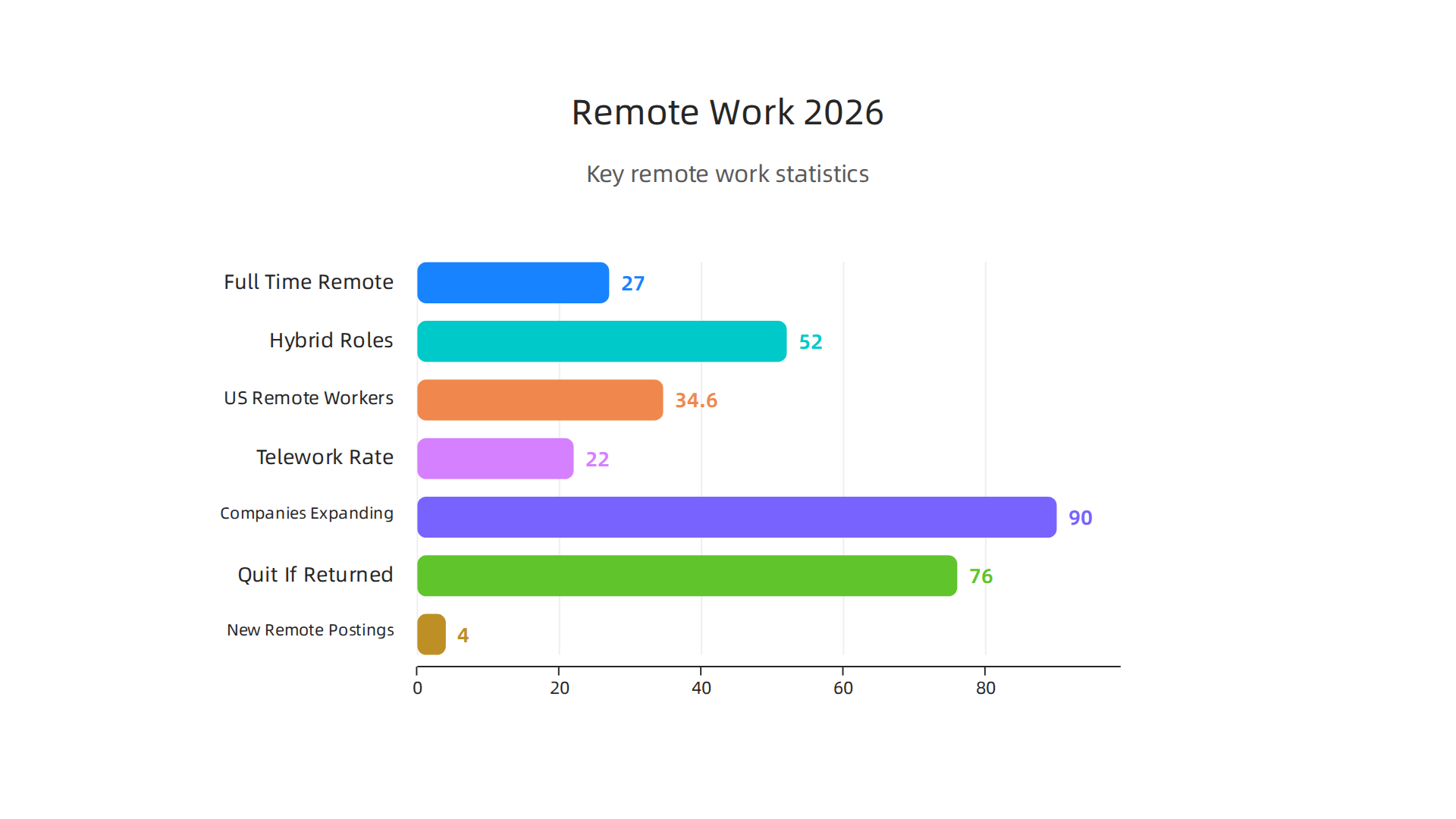
You are not alone. In 2026, about 27% of full-time employees around the world work remotely, and another 52% work in hybrid roles, according to research from Breeze.pm.
That means millions of people compete for the same remote openings. Meanwhile, scams disguised as dream work from home jobs keep multiplying. It is exhausting. And honestly, it is easy to feel like you are just throwing your time away.
The problem is not that great remote jobs do not exist anymore. The problem is that most job seekers use scattered tactics that do not work. They jump between the indeed job board and linkedin jobs without a clear plan. They apply fast, hope for the best, and wonder why nothing sticks.
What really works is a coordinated strategy that uses both platforms the right way. LinkedIn helps you build trust with recruiters and uncover opportunities before they go public. Indeed helps you cast a wider net and find roles you might miss otherwise. Combined, they become a powerful engine for your job board remote search. The trick is knowing how to use each one without repeating the same mistakes.
This article gives you a practical, evidence based approach to linkedin job search success. You will learn how to get past the noise, filter out scams, and position yourself so employers come to you instead of the other way around.
If you are tired of spinning your wheels, you are in the right place. And if you want extra help finding roles that are actually real, check out our complete guide on how to find legitimate remote jobs from home in 2026.
Ready to stop guessing and start landing real interviews? Explore Resources to see more guides designed for remote job seekers like you.
The Remote Job Landscape in 2026: Key Statistics and Trends
Before you dive into your linkedin job search, it helps to know what the remote job market actually looks like right now. Numbers tell a clear story. And they can help you focus your energy where it matters most.
In 2026, about 34.6 million Americans work remotely, with telework rates settling near 22%, according to recent data from Maker Stations. Another survey from SurveyMonkey shows that 15% of employees work completely from home, while 10% split time between home and office. So remote work is here to stay, but it is not as common as some headlines suggest.
Here is the bigger picture. Around 90% of companies plan to maintain or expand their remote options through 2026, according to research from Gable. And 76% of employees say they would quit if forced back to the office full time. That means demand for remote roles is high on both sides. But supply is tight. In Q1 2026, only 4% of new job postings were fully remote, according to Robert Half. The rest were on site or hybrid.
So what jobs are most in demand for remote? Based on industry trends, roles in IT (software development, cybersecurity, cloud support), digital marketing (content strategy, SEO, social media management), and customer service (virtual support, account management) top the list. These fields consistently post the most linkedin jobs and indeed job board listings tagged as remote or work from home.
That is where the two big platforms come in. LinkedIn is your best friend for building trust with recruiters, showcasing your skills, and finding jobs before they hit the open market. Indeed is the volume player: it shows you more listings across many sites, including smaller companies you might miss on LinkedIn. Together, they cover nearly every job board remote search you can make.
But here is the catch. Because remote jobs are so limited, scams multiply. Bad actors post fake roles on both platforms. You need to know how to spot them.
To learn more about filtering out fake postings, read our full guide on how to find Indeed remote jobs in 2026 and avoid scams.
Now that you understand the landscape, you can plan your linkedin job search with realistic expectations. The market is competitive, but it is also full of opportunity if you know where to look.
Ready to take the next step? Explore our resources and guides to kickstart your remote career.
Optimizing Your LinkedIn Profile for Remote Job Search
If you are serious about your linkedin job search, your profile is the first place to start.

Recruiters spend only seconds scanning profiles before deciding to message you or move on. So you need to make every part of your profile count.
Start with your headline and summary. These are the first things people see. Use headline formulas that include words like "remote," "distributed," or "flexible." According to the JobSprout LinkedIn Profile Optimization Guide for 2026, including these keywords helps you show up in more recruiter searches.

Your summary should tell a quick story about your remote readiness. Mention your experience working independently and collaborating across time zones. VirtualVocations recommends listing all relevant roles that show your career progression, especially ones that already used remote tools.
Next, add specific skills to your Skills section. Think about the tools you use daily: Slack, Zoom, Asana, Trello, or Notion. Also include soft skills like self-management, written communication, and time management. The complete LinkedIn profile optimization guide from Careerbldr suggests listing skills that match the remote roles you are targeting. After you add them, ask past colleagues to endorse those skills. Endorsements add social proof and make you look credible fast.
Turn on the "Open to Work" setting. This feature lets recruiters know you are actively searching. You can even specify that you are only looking for remote roles. LiftmyCV’s 2026 guide shows that optimized profiles land interviews three times faster. So do not skip this step.
Finally, share content regularly. Post short articles about your field, comment on industry news, and engage with others in your network. This keeps you visible to recruiters who browse linkedin jobs daily. DailyRemote’s advice highlights that consistent networking and sharing attract more recruiter attention naturally.
Now that your profile is stronger, you need to know what hiring managers actually look for in remote candidates. Our guide on decoding the remote hiring manager mindset breaks down exactly that.
Want personalized help with your profile? Contact us and talk to our team about getting tailored support for your remote job search.
Now that your LinkedIn profile is working for you, it is time to turn to one of the biggest job board remote platforms out there: Indeed. Over 200,000 remote job listings are live on Indeed right now, and with the right approach you can find the ones that fit you best. But you also need to watch out for scams. Let us walk through how to master Indeed filters, set smart alerts, and stay safe.
Set Up Precise Filters and Alerts
First, use the search bar on Indeed to type the job title you want. Then click the "Remote" filter.
According to Indeed’s own career advice, you can also add keywords like "work from home" or "fully remote" to narrow results. After you run your search, save it as a job alert. This way Indeed emails you new postings daily. You can set alerts for multiple roles too. This saves hours of scrolling.
You can also filter by pay range, experience level, and company type. For example, if you only want full-time remote jobs, use that filter. If you prefer contract work, choose that. The more specific you are, the better your matches.
Spot and Avoid Scams on Indeed
Scammers know job seekers are eager. So they post fake remote jobs that look real. Here are red flags to watch for:
- The job description asks for money upfront for training or equipment.
- The salary seems too high for the role.
- The company has no website or a poorly built one.
- They contact you via text instead of email or a professional platform.
- They offer you a job without an interview.
If something feels off, trust your gut. Check the company’s website and read employee reviews. You can also learn more about avoiding remote job scams in our detailed guide.
Use Company Reviews and Salary Data
Before you apply, look up the company on Indeed. Read the Company Reviews section. See what current and past employees say about work culture, management, and remote support. Indeed also shows salary data for many roles. This helps you know if the offer is fair and if the company has a good reputation.
One powerful trick: use the "Salary" filter to exclude jobs that pay below your minimum. This saves time and keeps you focused on real opportunities.
Your Next Step
Mastering Indeed takes a little setup, but once your filters and alerts are in place, the right jobs come to you. Want to dig deeper into smarter search strategies? Check out our guide on how to land Indeed remote jobs with a smarter search strategy.
If you need personalized help building your remote job search plan, book a chat with our team. We are here to help you find legitimate remote work faster.
Crafting ATS-Friendly Resumes and Cover Letters for Remote Roles
You have set up job alerts on Indeed and sharpened your LinkedIn job search. Now comes the part where your application actually gets seen. Many companies, especially large remote ones, use applicant tracking systems (ATS) to screen resumes before a human ever looks at them. In 2026, almost half of job seekers use longer resumes partly because they worry about ATS rejection, according to HR Dive. The good news: you can beat the machine with a few smart moves.
Pull Keywords from Remote Job Descriptions
The first step is to find the exact words employers use. Look at three or four remote job postings for roles you want. Highlight terms like "asynchronous communication," "self-motivated," "remote collaboration (Slack, Zoom)," "results driven," or "time management." Then work those keywords into your resume naturally. ATS tools scan for these matches, and if your resume has them, you move up. For a full walkthrough on matching keywords for remote roles, check this 2026 guide to remote resume optimization.
Also use your LinkedIn job search to find company skills sections and job descriptions that repeat certain requirements. That is a goldmine for keywords.
Keep Formatting Simple and Machine Friendly
ATS bots struggle with fancy layouts. Avoid columns, tables, graphics, or unusual fonts. Use standard fonts like Arial, Calibri, or Times New Roman at 10 to 12 points. Save your resume as a plain .docx or .pdf (some ATS prefer .docx). Use bullet points but keep them clean. Do not use headers inside tables or text boxes. The ATS Optimization Hub offers a free scanner to test if your resume will pass.

For a step by step on resume structure that passes ATS for remote jobs, you can also watch this video guide that shows a working template.
Tailor Your Cover Letter for Remote Competency
Your cover letter is where you prove you can handle remote work. Do not just repeat your resume. Instead, talk about your home office setup, how you stay on task, and times you worked independently. Use phrases like "I thrive with minimal supervision," "I manage multiple projects using Trello and Slack," or "I communicate effectively across time zones."
Employers on LinkedIn Jobs and other job board remote sites look for self discipline. Show you have it. Keep your cover letter to three short paragraphs. Use the same keywords from the job description but in sentence form.
If you want more ideas on what remote employers really want, read our guide on how to decode the remote hiring manager mindset. It will help you write letters that actually get read.
Your Resume Checklist for Remote Roles
Before you hit submit, run through this quick list:
- Keywords from the job description are in your summary, skills, and experience sections.
- Font is standard (Arial, Calibri, Times New Roman).
- No columns, tables, or images.
- File is saved as .docx or clean .pdf.
- Cover letter mentions remote work skills (self discipline, communication, tech tools).
Once your resume and cover letter are ATS ready, you can apply with confidence. Need more resources to land your next remote role? Explore Resources for templates, checklists, and expert tips.
LinkedIn Networking: Building Connections That Land Remote Offers
Your resume is ATS ready and your cover letter shows you can handle remote work. Now you need people to actually see them. That is where LinkedIn comes in. In 2026, the best way to get a remote job is not just applying to LinkedIn Jobs. It is building real connections with the people who do the hiring.

Think of your LinkedIn job search as two parts: applying to postings and networking with professionals. The second part is what sets you apart.
Connect with Remote Hiring Managers and Team Members
Do not send blank connection requests. When you find a company on LinkedIn Jobs that you like, look up the hiring manager or team members. Send a short note. Say something like: "Hi [Name], I saw your company is hiring for [role] and I admire your work on [project]. I would love to connect and learn more about the team culture." That is not spammy. It shows you did your homework.
Also connect with people who already work in remote roles you want. Ask about their day to day. Most remote workers are happy to share advice. For more ideas on what remote hiring managers look for, check out our guide on how to decode the remote hiring manager mindset. It will help you write messages that get replies.
Use InMail the Right Way
InMail is a paid feature, but it can work if you use it smartly. Do not copy paste the same message to 50 people. Personalize each one. Mention something specific from their profile or a recent post. Keep it short. Three sentences max. Ask a simple question like: "What is the biggest challenge your remote team faces right now?" People like to talk about their work.
Join LinkedIn Groups and Comment on Posts
One of the easiest ways to get noticed without sending a single message is to join groups related to remote work and your industry. Find group discussions about remote challenges or tools. Comment with useful insights. For example, on a post about remote productivity, you could share a tip about time blocking. That shows you are knowledgeable and engaged.
When you comment on posts from remote companies or recruiters, your name stays visible. Over time, they start to recognize you. This is a low pressure way to build a reputation.
A great resource for optimizing your entire LinkedIn job search is this LinkedIn profile optimization guide from JobSprout. It gives you headline formulas and summary examples that work in 2026.
Your Networking Checklist for Remote Roles
- Profile is optimized with keywords from your target remote jobs.
- Connection requests include a personalized note.
- You comment on at least three posts per week in remote work groups.
- You follow companies you want to work for.
- You send follow up messages after applying to keep the conversation alive.
Networking takes time, but it pays off. The people you connect with today could be the ones referring you tomorrow. Ready for more help? Explore Resources for templates, checklists, and expert tips.
Coordinating LinkedIn and Indeed: A Dual-Platform Strategy
You have built your LinkedIn network and optimized your profile. Now you need to cast a wider net. That is where pairing LinkedIn Jobs with the Indeed job board gives you an edge. Each platform works differently, and using both together helps you find more opportunities while staying organized.
When to Apply Directly vs. Through a Platform
A good rule of thumb: if a company has an easy application on LinkedIn Jobs or Indeed, use it for speed. But if the company’s career page asks you to apply there, go directly. Why? Some companies track internal applications first. Applying on their site can get you in front of the recruiter faster. For smaller companies or startups, the direct route often works better. For larger firms, the platform application is fine.
Use Each Platform’s Tracking Tools
Both LinkedIn job search and Indeed have built in trackers. On LinkedIn, turn on the "Applied" badge. That keeps a list of every job you have applied to. On Indeed, use the "My Jobs" section to save and track applications. You can also set up job alerts so new remote roles come to you. Indeed even has a guide on how to set up remote job alerts directly from your profile. Checking these alerts daily keeps you from missing fresh postings.
Your Weekly Rhythm for a Balanced LinkedIn Job Search
Here is a simple weekly plan to keep both platforms working for you:
- Monday: Update your profile and resume based on new keywords you see. Set or refresh job alerts on LinkedIn Jobs and Indeed.
- Tuesday and Thursday: Spend 30 minutes applying to roles. Use LinkedIn for networking warm leads and Indeed for volume applications.
- Wednesday: Comment on LinkedIn posts and send follow ups to connections you made last week.
- Friday: Review your applied lists on both platforms. Remove roles that are no longer open or that you no longer want. Plan next week’s target companies.
For more tips on using the Indeed job board efficiently, check out our guide on how to land Indeed remote jobs with a smarter search strategy. It covers filters and keywords that reveal hidden remote roles.
This dual approach reduces duplicate applications and helps you stay consistent. If you want personalized help setting up your weekly job hunt plan, Get Advice from our team.
Measuring Your Progress: Tools and Metrics for Job Search Success
You have a weekly rhythm for your LinkedIn job search and Indeed applications. But are you actually getting results? Without tracking, you are flying blind. A few simple metrics can show you what is working and what needs to change.
Key Metrics to Watch
Start with these three numbers:
- Applications sent each week. This tells you if you are hitting your volume targets.
- Interviews you land. Track both initial phone screens and deeper rounds.
- Response rate. Divide interviews by applications. A low rate means your resume or profile needs work.
For example, if you send 20 applications and get 1 interview, your response rate is 5%. If the average for your industry is higher, it is time to optimize.
Tools for Tracking
You do not need fancy software. A simple spreadsheet works fine. Create columns for company, role, date applied, platform (LinkedIn Jobs or Indeed job board), follow up date, and status. Review it each Friday like the weekly plan suggested.
For serious job seekers, a lightweight CRM like HubSpot’s free tier or a dedicated job search app can help.
The key is consistency. Update it right after each application.
A/B Test Your Application Materials
This is where tracking becomes powerful. Try two versions of your resume or LinkedIn profile for a week. See which one gets more callbacks. According to the 2026 ATS optimization guides (Optimizing Resume Design for Remote Workers in 2026), small changes like swapping keywords or reordering bullet points can boost your pass rate. Many job seekers now use resumes longer than one page to include more relevant keywords, as reported by HR Dive.
When you find a version that works, lock it in and keep testing other parts. For a deeper look at what hiring managers really want, read our guide on decoding the remote hiring manager mindset. It covers how to tailor your application for better conversion.
Tracking turns guesswork into a strategy. Use the data to refine your LinkedIn job search and overall approach. If you want more templates and tutorials, Explore Resources on our site to build a smarter job hunt system.
Common Mistakes to Avoid on LinkedIn and Indeed
Tracking your progress helps you see what is working. But sometimes the biggest gains come from stopping bad habits. Here are some common mistakes that hurt a linkedin job search or an Indeed strategy.
The biggest mistake is sending the same application to every job. Recruiters can tell. You need to tailor your resume and cover letter for each role. Another big miss is having a weak LinkedIn profile. Even if you apply to linkedin jobs, recruiters will check your profile. If it is not complete, they move on. For a deeper look at what hiring managers expect, read our guide on decoding the remote hiring manager mindset.
Scams are everywhere in 2026. If a job on the indeed job board offers a huge salary for little work or asks for money upfront, run. Do not waste your time on fake postings. Learn how to protect yourself in our guide on how to find Indeed remote jobs and avoid scams.
Do not put all your eggs in one basket. Use both LinkedIn and Indeed together. Each job board remote search gives different results. After you apply, do not just wait. Follow up. Connect with someone on the team. A simple message can get your application noticed. For a smarter plan, see our strategy for landing Indeed remote jobs with a smarter search strategy.
Avoiding these mistakes will save you time and help you land a job faster. If you want personalized tips or have a specific situation, do not hesitate to Get Advice from our team.
Summary
This article gives a practical, step-by-step approach to finding legitimate remote work using LinkedIn and Indeed together. It explains the 2026 remote labor market, which roles are most common, and why a coordinated strategy beats scattershot applying. You’ll learn how to optimize your LinkedIn headline, summary, skills, and networking to attract recruiters, plus how to set precise Indeed filters, alerts, and company-salary checks to find real listings. The guide also covers spotting and avoiding scams, making your resume and cover letter ATS-friendly for remote roles, and a weekly rhythm to balance networking with volume applications. Finally, it shows how to track applications and run simple A/B tests so you can measure what works and improve over time. After reading, you’ll have a clear, repeatable plan to find higher-quality remote opportunities and get more interviews.